Santa Barbara Clerk of Court serves as the administrative center for court records and filing activities in Santa Barbara. This office supports the judicial operations of the local court system by maintaining official documents, organizing case files, and handling public record requests. It operates under the authority of the Santa Barbara County Superior Court and plays a key role in keeping legal processes organized and traceable. Through its services, the clerk office supports attorneys, litigants, and members of the public who require verified case information, certified copies, or case status details. It also helps maintain consistency in record keeping across civil, criminal, family, and probate matters handled within the county.
The scope of services provided by the clerk office covers several essential court-related functions, starting with case filing and document submission. Individuals and legal professionals submit petitions, motions, and other filings, which the office reviews, records, and assigns to active cases. In addition, the office manages document processing by entering filings into the case management system, verifying accuracy, and updating docket entries. Court records management is another major function, involving the storage, indexing, and retrieval of case files for public or authorized access. The clerk office also supports case lookup services, where users can request information using case numbers or party names. These combined services help maintain an organized system for handling legal documents and public records within the court framework.
Current Clerk of Court: Roles and Responsibilities
The Court Executive Officer for the Santa Barbara County Superior Court role includes Clerk of Court responsibilities during tenure, and Darrel E. Parker has served in this capacity. The Clerk of Court in Santa Barbara County Court manages court administration, record handling, and document processing for the local judicial system within Santa Barbara. This office supports case operations by maintaining official documents, organizing filings, and assisting with public record requests. It also works closely with court departments to keep case workflows structured and accurate across civil, criminal, family, and probate matters.
Administrative and Judicial Support Functions
The Clerk of Court performs a wide range of administrative duties that support courtroom operations and case management. These functions include processing filings, maintaining calendars, and handling public inquiries related to court cases. The office also prepares case documents for hearings and assists with scheduling tasks that keep proceedings organized. Coordination with the superior court remains a key responsibility. The clerk office works alongside court staff to manage workflows and maintain proper documentation across departments. This coordination helps ensure that case files are complete, accessible, and updated in real time. Through these tasks, the clerk office acts as a central administrative unit that keeps court operations structured and efficient.
- Processing incoming legal filings and motions
- Maintaining court calendars and scheduling records
- Assisting judges with document preparation
- Responding to public and attorney inquiries
- Supporting courtroom clerks during hearings
Record Management and Case Documentation
Record management forms one of the most important responsibilities of the Clerk of Court. The office maintains official legal records for civil, criminal, family, and probate cases filed within the county. These records include petitions, motions, judgments, orders, and other case-related documents submitted over time. The process of maintaining records involves organizing, indexing, and storing documents in both physical and digital formats. The clerk office also updates case files as new filings are submitted, ensuring that each record reflects the latest case activity. Retrieval services allow authorized users and the public to request copies or view case details based on case numbers or party names.
Record management tasks include:
- Indexing and archiving case documents
- Updating docket entries with new filings
- Providing certified copies of court records
- Managing public record requests
- Supporting case lookup and verification processes
How to Search Santa Barbara Court Records
Santa Barbara court records can be searched using the official online portal, in-person visits, or mail requests through the Santa Barbara County Superior Court. Users typically begin with a case number or party name to perform an accurate case lookup across civil, criminal, family, or probate matters. The process helps locate public records, view case summaries, and request certified documents related to filings within Santa Barbara.
Steps to Search
- First go to the official site:https://www.santabarbara.courts.ca.gov/online-services/case-records-search
- Accept the user agreement
Read the terms and click Agree/Accept to continue to the search portal. - Select the Public Portal
Choose the option that leads to the public case records portal for general access. - Select Smart Search
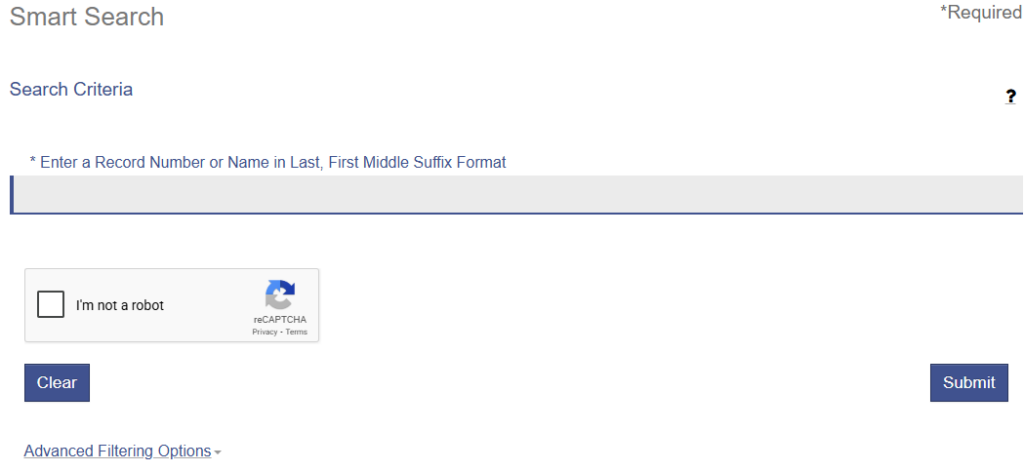
Inside the portal, click on Smart Search to begin searching by case details. - Enter the case number or party name
Input the case number for precise results, or use a party name if the case number is not available. - Apply filters if needed
Choose case type (civil, criminal, family, probate) to narrow results. - Click Search
Submit the query to view matching case records and summaries. - Review the results
Check case status, party details, and register of actions. - Open the case details
Click on a result to view available information and document listings. - Request documents if required
For full copies or certified records, follow the instructions to request through the clerk office (in person, mail, or request form).
Case Filing, Document Submission, and Court Records Access
The Clerk of Court manages how legal cases are filed, processed, and recorded within the court system of the Santa Barbara County Superior Court. This process supports accurate record keeping, case tracking, and public access to legal information in Santa Barbara. From initial filing to final record storage, the clerk office ensures that documents meet court standards and are properly entered into the system. It also provides multiple ways for users to request and retrieve records depending on their needs. The office follows structured procedures to maintain consistency in filings and reduce processing errors. It also helps users understand basic requirements before submitting documents to the court.
Filing Requirements and Case Types
The clerk office handles a wide range of case types, each requiring specific forms and documentation. These case categories include civil disputes, criminal charges, family matters, probate issues, and small claims cases. Each type follows defined procedures that align with court rules and filing standards. Different case types require different supporting documents, such as petitions, complaints, motions, or responses. Submitting the correct paperwork helps avoid delays and ensures that the filing is accepted without issues.
- Civil cases – disputes between individuals or organizations
- Criminal cases – offenses filed by the state
- Family cases – divorce, custody, and related matters
- Probate cases – estates, wills, and asset distribution
- Small claims – simplified disputes for limited amounts
Submission and Processing Workflow
Once documents are prepared, they are submitted to the clerk office for review and validation. The clerk checks whether the filing meets all required guidelines, including formatting, completeness, and applicable fees. If the submission meets the standards, it proceeds through the processing stage. During processing, the clerk assigns a case number, which becomes the unique identifier for tracking the case. The document is then entered into the court’s case management system, where it becomes part of the official record.
Typical workflow steps include:
- Submission of documents at the clerk window, online portal, or by mail
- Verification of completeness and compliance
- Fee collection, if applicable
- Assignment of a case number
- Entry into the court database for tracking
Court Record Availability and Access Types
Court records maintained by the clerk office are classified based on access level and legal restrictions. Most records are considered public records, meaning they can be viewed by individuals through proper channels. These include case summaries, registers of actions, and certain filed documents. However, some records are restricted or confidential due to privacy laws or court orders. These may include sealed records, juvenile cases, or sensitive family law matters. Access to such records typically requires authorization or a valid legal reason.
Types of record access include:
- Public records – available for general viewing and case lookup
- Restricted records – limited access due to confidentiality rules
- Certified copies – official documents with court seal
- Uncertified copies – for informational use only
Methods for Retrieving Court Records
Users can retrieve records through several methods depending on convenience and record type. Each method provides a different level of access and processing time, and court case search is commonly used for quick lookups and basic case details. Each method supports different needs. Online tools provide quick case lookup, while in-person and mail requests are commonly used for certified copies and complete document retrieval.
- In-person visits
Individuals can visit the clerk office to request records directly. Public terminals may be available for case lookup, and staff can assist with locating files. - Online search systems
Some records can be searched through the court’s official online portal. Users can enter a case number or party name to view available case details and summaries. - Mail or formal requests
Requests for copies, especially certified documents, can be submitted by mail or through official request forms. This method is often used for obtaining legal copies without visiting the courthouse.
Clerk Office Operational Structure and Workflow
The Clerk of Court operates within a structured system that supports case processing, record management, and coordination across departments in the Santa Barbara County Superior Court. Its operational framework helps manage filings, maintain accurate records, and support daily court activities within Santa Barbara. Through organized workflows and internal communication, the clerk office ensures that documents move efficiently from submission to final storage. This structure also helps maintain consistency, reduce processing errors, and keep case information updated for both staff and public use.
Internal Workflow of Clerk Operations
The internal workflow of the clerk office begins when documents are received through in-person submission, mail, or online filing systems. Each document goes through an intake process where staff review the submission for completeness, correct formatting, and required fees. If the filing meets the required standards, it moves forward for processing. After intake, documents are routed to the appropriate department based on case type. The clerk then assigns a case number and enters the information into the court’s case management system. This step ensures that each filing is tracked and linked to the correct case file.
- Document intake and initial review
- Verification of required information and fees
- Routing to the correct case category
- Assignment of case numbers
- Entry into the court database for tracking
Coordination Within the Court System
The clerk office works closely with judges, courtroom staff, and legal personnel to support case handling and court proceedings. This coordination ensures that all case documents are available when needed and that schedules align with court calendars. The clerk office acts as a communication link between different departments within the court system. Interaction with judges involves preparing case files, organizing submitted documents, and ensuring that all required materials are available before hearings. Legal staff and attorneys rely on the clerk office for accurate filings, case updates, and access to records needed for proceedings.
- Sharing case files and documents with judicial staff
- Supporting courtroom scheduling and docket management
- Updating case status based on court actions
- Responding to document requests from attorneys and parties
- Maintaining communication across administrative units
Legal Documentation Standards and Compliance Requirements
Legal documentation submitted to the clerk office must follow defined standards set by the Santa Barbara County Superior Court. These standards help maintain uniform records, reduce filing errors, and support proper case handling within Santa Barbara. Documents that meet formatting and procedural rules are more likely to be accepted without delay. The clerk office reviews each submission to confirm it aligns with required legal formats and contains all necessary details before entering it into the court system. This process supports reliable record keeping and consistent handling of all case filings.
Standards for Legal Document Submission
Legal documents submitted to the clerk office must follow specific formatting and content requirements. These standards apply to both physical and electronic filings and are designed to keep records clear, readable, and consistent across all case types. Each document must include proper headings, party names, case identifiers (if available), and correct signatures. In addition, filings must follow court-specific rules regarding page limits, formatting style, and document structure. Missing or improperly formatted documents may be rejected or returned for correction. Meeting these standards helps ensure that the filing process proceeds smoothly and that documents are properly recorded in the court system.
- Proper document title and case caption
- Correct formatting of margins, fonts, and spacing
- Inclusion of party names and contact details
- Required signatures from involved parties or attorneys
- Attachment of supporting exhibits or references when needed
Compliance with Court Procedures
Compliance with court procedures refers to following all legal and administrative rules required for valid document submission and case processing. The clerk office verifies that each filing meets procedural requirements before accepting it into the system. This includes checking deadlines, fee payments, and adherence to applicable rules for different case types. Accuracy plays a key role in compliance. Information such as party names, dates, and case details must match official records to avoid discrepancies. Incorrect or incomplete data may lead to delays, rejection, or the need for resubmission. The clerk office also ensures that filings meet legal validity standards before acceptance. This process helps maintain the integrity of court records and supports fair and consistent handling of all cases within the judicial system.
- Submission within required deadlines
- Payment of applicable filing fees
- Accurate and complete case information
- Adherence to court rules and local procedures
- Proper authorization or signatures where required
Case Tracking and Status Monitoring System
The case tracking and status monitoring system helps manage and follow legal cases handled by the Santa Barbara County Superior Court. It allows users to monitor case activity, view updates, and confirm current status within Santa Barbara. The clerk office maintains this system by recording filings, updating case events, and organizing information in a centralized database. Through structured tracking methods, each case remains identifiable and traceable from the time of filing until final resolution. This system supports attorneys, court staff, and the public by providing consistent and updated case information.
Case Tracking Mechanisms
Case tracking begins when a filing is accepted by the clerk office and assigned a unique case number. This number serves as the primary identifier for all documents, actions, and updates related to that case. It allows the court system to organize records and link all filings under one reference. Tracking mechanisms rely on digital case management systems that store and organize case data. Each entry in the system corresponds to specific actions such as filings, hearings, motions, or rulings. These records are updated continuously as new information becomes available. This structured tracking approach allows users to locate cases quickly and follow their progress using identifiers such as case number or party name.
- Assignment of a unique case number at intake
- Linking all filings and documents to the case ID
- Recording docket entries for each action taken
- Categorizing cases by type (civil, criminal, family, probate)
- Maintaining searchable records for case lookup
Status Updates and Case Progression
Case status updates reflect the current stage of a legal case from filing through resolution. The clerk office updates these statuses as new actions occur, such as hearings, rulings, or document submissions. Each update is recorded in the case management system and may be visible through public search tools or case summaries. A typical case progresses through several stages, starting with filing and moving through pre-trial motions, hearings, and final judgment. The status may change multiple times depending on court activity and procedural developments.
- Filed – case has been submitted and accepted
- Pending – case is awaiting review or hearing
- Active – case is in progress with ongoing actions
- Continued – hearing or action has been rescheduled
- Disposed/Closed – case has reached final resolution
Location and Contact Information
The Clerk of Court operates under the Santa Barbara County Superior Court and serves users within Santa Barbara. The office provides multiple ways for the public to connect for record requests, case inquiries, and document-related assistance. Individuals can reach the clerk office through its physical locations or by using available communication channels such as phone, email, or in-person visits. These options help users obtain case information, request copies of records, and receive general support related to court services.
Location of the Clerk Office
The Clerk of Court has designated service locations within Santa Barbara County where users can visit for records and filing services. These offices are part of the Superior Court system and handle different types of requests based on case category and geographic division.
Typical locations include:
- Santa Barbara Courthouse (South County Records)
Located at 118 E. Figueroa Street, Santa Barbara, CA 93101 - Santa Maria Courthouse (North County Records)
Located at 312 E. Cook Street, Santa Maria, CA 93454
Contact Info
The clerk office provides several communication options to assist users with inquiries and record requests. These channels allow individuals to choose the most convenient method based on their needs and urgency.
Communication options include:
- Phone support
Users can call the main clerk office at (805) 882-4520 to ask about case status, record availability, or filing requirements. - Email communication
Users can send inquiries and document requests to the official court email: info@sb-court.org for general assistance related to records and case lookup. - In-person assistance
Visiting the courthouse allows users to speak directly with clerk staff, submit requests, or use public terminals for searching records.
Frequently Asked Questions
Santa Barbara court-related questions often focus on the role of the Clerk of Court, record access, and filing procedures. The Clerk operates under the Santa Barbara County Superior Court and supports public services within Santa Barbara. This section addresses common inquiries about responsibilities, record searches, public access, certified copies, and filing requirements. The answers below help users understand how court records work, what information is needed, and how different services are handled by the clerk office.
What does the Santa Barbara Clerk of Court do?
The Clerk of Court provides administrative and recordkeeping support for the court system. It manages case filings, processes legal documents, and maintains official court records for civil, criminal, family, and probate matters. The office also assists the public with record requests and case-related inquiries. By organizing and preserving accurate records, the clerk office helps ensure that court operations run smoothly and that case information remains accessible through proper channels within the judicial system. It also coordinates with court staff to maintain workflow efficiency across departments. In addition, it helps maintain consistency in record indexing and case documentation for future reference.
How can I search for court records in Santa Barbara?
Court records can be searched using a case number, party name, or filing date. Users may conduct a search by visiting the courthouse in person or using available online case lookup systems provided by the court. In some situations, formal requests may be required to retrieve specific documents. Accurate details improve search results and reduce delays. Public terminals at the courthouse may also assist users in locating basic case information and record summaries. Search results may include case status, hearing dates, and basic docket information. For detailed files, users may need to submit a request or visit the clerk office directly.
Are Santa Barbara court records public?
Many court records are available to the public, allowing individuals to review case information, filings, and related documents. However, access depends on legal restrictions, privacy rules, and the type of case involved. Certain records, such as those involving minors or sensitive legal matters, may be restricted. In such cases, access may require authorization or a valid legal reason. Public access policies help balance transparency with privacy protections within the court system. Users should check record eligibility before requesting documents. Some restricted records may only be viewed by authorized parties or through court-approved procedures.
How do I obtain certified copies of court documents?
Certified copies can be requested directly from the clerk office through in-person visits, mail, or formal application processes. After submitting a request, the clerk verifies the document and processes the certification. Certified copies include an official court seal that confirms authenticity. These documents are commonly used for legal, official, or governmental purposes. Applicable fees may apply depending on the number of pages and the type of record requested from the court. Processing times may vary based on workload and request type. Users may also be required to present identification or additional details when submitting their request.
What information is needed to file a case?
Filing a case requires submitting specific documents based on the case type, such as civil, criminal, family, or probate. Applicants must provide completed forms, identification details, and any supporting evidence required by the court. The clerk reviews submissions for completeness before assigning a case number. Accurate and properly formatted documents help avoid delays in processing. Once accepted, the case becomes part of the official court system and is tracked through its lifecycle. Additional requirements may apply depending on the nature of the case. Filing fees or fee waiver requests may also be part of the submission process.